Thin Service Pages Make Good Businesses Look Generic
Quick Answer
Thin service pages do more than hold back rankings. They erase the details that help a homeowner trust a local service business, which makes even strong companies feel interchangeable. The fix is not adding fluff. It is adding specific service scope, process, proof, service-area clarity, and a clear next step on pages that still feel generic after a 20-second mobile review.

Thin Service Pages Make Good Businesses Look Generic
Thin service pages do not just make SEO harder.
They make a good business look like every other business in town.
That is the bigger cost.
When a homeowner lands on a service page and sees 200 words of vague promises, a stock photo, and a button that says Call Now, they still do not know enough to trust you. They cannot tell what kind of jobs you actually want, how you work, what makes your crew different, or whether you are the right fit.
So they do what people always do when the page gives them nothing useful.
They back out. They compare on price. Or they call the shop whose page feels more specific and more real.
Thin Service Pages Are Not Neutral
A lot of owners treat thin pages like a temporary problem.
“We’ll flesh those out later.” “At least the page exists.” “We just need a page for each service.”
I get why that happens. Service pages are not glamorous work. But a weak page is not sitting there harmlessly. It is actively flattening the business.
Google’s current people-first guidance asks whether a page gives a substantial, complete description, adds original value, and actually helps the reader achieve their goal. That is a useful standard even if you forget rankings for a second — because it matches how real people read service pages.
They are not looking for filler. They are looking for proof.
If the page reads like it was built to catch a keyword instead of help a customer make a decision, it usually feels that way.
The Copy-Paste Service Area Problem
Here is something I see constantly when I audit service pages for small businesses.
A company serves their home market well. Then they decide to expand — three or four towns within ten or fifteen miles. So they build a page for each one. Same copy, different city name swapped into the header. Maybe the URL changes. That is it.
Google sees through it immediately. Those pages are functionally identical. They do not rank. They do not show up in the map pack. And increasingly, they do not appear in AI search results at all — because AI search pulls from pages that demonstrate actual knowledge of a place, not pages that name-drop it.
The problem is not that you built service area pages. The problem is that copy-pasted pages tell Google you are just fishing for terms, not actually serving those communities. Google has specific spam guidance around this — pages built mainly to catch similar searches without giving the visitor added value are not a smart long-term bet, and that guidance has teeth now in a way it did not two or three years ago.
Each service area page needs to be its own thing. What neighborhoods do you actually work in? What are the common job types in that market? Are there permit quirks, soil conditions, code differences, or infrastructure characteristics specific to that area that affect the work? Do you have any history there — jobs completed, customers served, local references? That is the kind of detail that makes a page useful to a real visitor and credible to a search engine. One without the other does not get you far.
Your Website Is Where People Verify You
This part matters more now, not less.
DreamHost’s 2026 Local Business Trust Index found that 69% of consumers say a website is essential for a local business to be credible. For contractors and home service providers specifically, 66% said they are more likely to hire a company with a website. It also found that 58% often or always check the website to verify what they saw somewhere else.
That tracks.
People might find you on Google, Maps, Facebook, a referral thread, or even AI search. But when the job matters, they still go to the website to make sure you look real.
And Clutch’s 2025 trust survey says that decision happens fast. It reported that 83% of consumers judge a website’s credibility in under 20 seconds, and 45% say the first impression shapes whether they keep engaging.
So if your service page is thin, generic, or a city-swapped copy of three other pages, you are not just missing SEO content. You are failing the verification step.
What Thin Service Pages Usually Leave Out
Most thin pages miss the exact details that separate a solid local operator from a generic listing.
They do not explain the real job.
A plumbing page says “we handle water heater services” but never tells the customer whether you repair, replace, install tankless units, handle code upgrades, or help them decide when replacement makes more sense than patching. An HVAC page says “maintenance keeps your system running efficiently” but never shows what a maintenance visit actually includes, who it is best for, or what you typically find when you get there. A roofing page says “we provide reliable roof repair” but never explains what counts as a repair call, how quickly you can inspect, or when you tell a homeowner the roof is too far gone to patch.
Those details matter. They help the customer qualify themselves — the right jobs call, the wrong jobs self-select out. And they make the business sound like it has actually done the work before.
Thin pages also usually hide the trust signals people are looking for:
- specific service scope
- service area clarity
- real photos or grounded proof
- process details
- timing expectations
- common questions
- a next step that feels clear instead of pushy
Without those things, the business starts to sound interchangeable. Good company, generic page, lost advantage.
The Mobile Version Cannot Be the Skinny Version
This is where a lot of service sites quietly hurt themselves.
Google uses the mobile version of a site’s content for indexing and ranking. If the mobile page has less content than the desktop page, expect traffic loss — Google is working from less information.
Most local service traffic is happening on a phone. If the mobile page strips out the useful details, collapses the proof, buries the CTA, or turns the whole page into a few vague lines and a stock photo, the visitor is left with even less reason to trust you.
The fix is to keep the substance and present it cleanly. Use accordions if you need to. Tighten the layout. Shorten the paragraphs. But do not remove the information that helps someone decide.
What a Strong Service Page Actually Needs
A strong service page usually does five things.
1. It names the real job
Not just the service label. It explains what the customer is dealing with, what kind of work you do under that service, and what situations make someone a fit to call.
2. It shows how you work
People do not just want to know that you offer the service. They want to know what happens next. Do you inspect first? Can you give options? Do you handle emergency calls? Do you serve certain towns or zip codes? What does the appointment actually look like? That specificity lowers friction in a way a headline never will.
3. It proves you are specific, not generic
Local photos, grounded examples, before-and-after context, review snippets, crew details, warranty language — these do real work. Not because every page needs to be fancy. Because vague pages feel risky, and a page that knows the territory feels like someone who has actually done this job.
4. It answers the questions that normally stall the call
What does this service include? How fast can you usually get out? Do you work on this equipment or problem type? When is repair still worth it? If the page answers none of that, it is leaving too much of the decision until the phone call — and a lot of those calls never happen.
5. It gives the visitor a clean next move
Call. Book. Send photos. Request an estimate. Check service area. Whatever the right next step is, make it obvious. A surprising number of service pages make the customer do detective work at the exact moment they were ready to move.
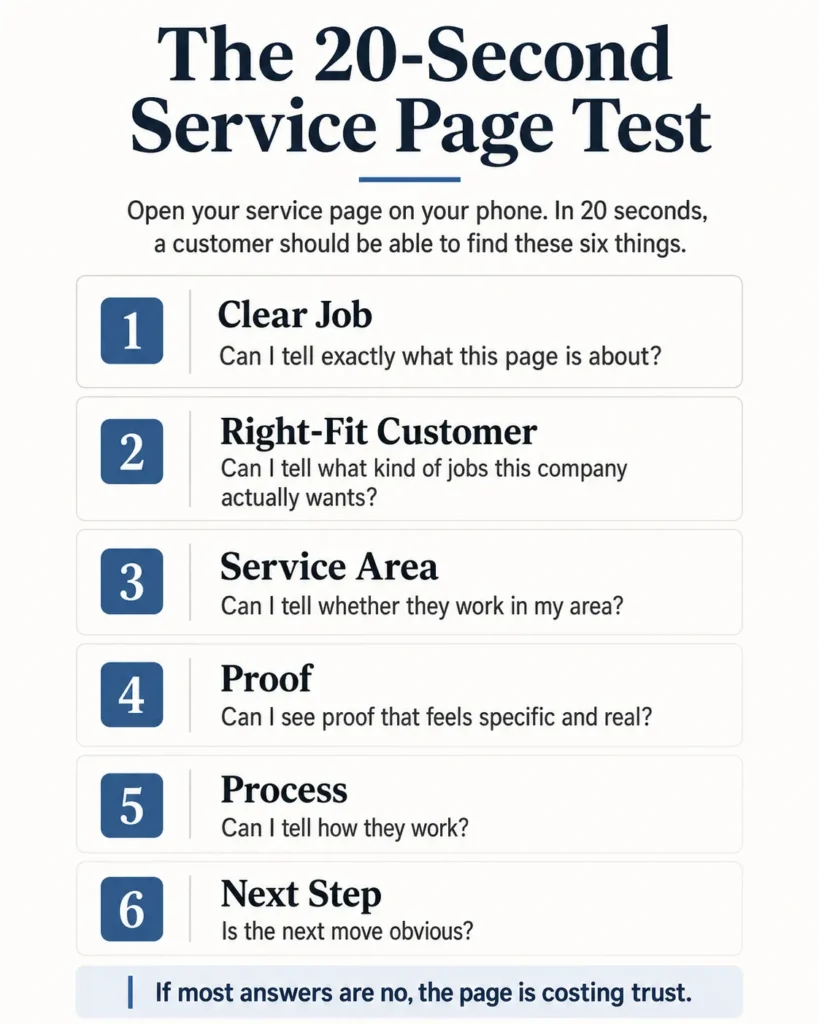
Run the 20-Second Test
If you want to know whether thin service pages are making your business look generic, do not start with a content calendar.
Start with your five most important service pages on a phone.
Give yourself 20 seconds on each one and ask:
- Can I tell exactly what this service page is about?
- Can I tell what kind of jobs this company actually wants?
- Can I see what makes them different from the next three businesses?
- Can I tell whether they work in my area?
- Can I see proof that feels specific and real?
- Is the next step obvious?
If the answer is mostly no, the page is not just thin. It is costing trust. And if you have service area pages that are copies of each other with the city name swapped, that is not a content problem — it is a credibility problem, and Google is treating it that way.
Final Word
A thin service page does not make a bad business look bad.
Usually that part was already handled.
What it does is make a good business look ordinary.
When your page is vague, the customer cannot see the difference between your company and the cheaper, sloppier, less organized shop down the road. So the decision gets pushed onto price, star rating, or whoever answered first. That is a rough place to compete from if the business is actually better than that.
Service pages should not exist just to say you offer something.
They should make the right customer think, “These are my people.”
Frequently Asked Questions
Do I really need longer service pages if most of my work comes from referrals?
You do not need longer pages for the sake of length. You need clearer pages. Even referred customers still check the website to make sure the business looks real, specific, and worth calling. If the page is vague, the referral trust gets weaker right when the customer is trying to verify you. Next step: Open your top referral service page on your phone and check whether a stranger could tell what job you actually do in 20 seconds.
What should a plumbing or HVAC service page say besides “we offer this service”?
It should explain the real job. That means what problems you handle, what the visit includes, whether you repair or replace, who the service is for, and what happens after the customer calls. Those are the details that make a shop sound specific instead of generic. Next step: Rewrite one service page intro so it names the exact job, the kind of customer, and the next step instead of using broad promises.
Won’t adding more detail just make the page feel stuffed?
Not if the detail is useful. Stuffed pages repeat keywords and city names. Strong pages answer real customer questions, show process, and make the next move easier. The difference is whether the extra words help someone decide. Next step: Cut one vague paragraph and replace it with one concrete section about scope, timing, or how your crew handles the job.
What if I only have one truck and no time to build a huge page for every service?
Then do the important pages first and make them real. One solid water-heater page, drain-cleaning page, or AC-repair page will help more than ten thin placeholders. The goal is not volume. It is making your best money pages specific enough to earn trust. Next step: Pick the top three services that produce the best jobs and improve those pages before touching the rest.
How do I show the difference between us and the other shops in town without sounding salesy?
Use the details you already live with every day. Explain what kind of jobs you take, how your process works, what customers should expect, what you check, what you do not recommend, and what makes the experience smoother. Real operational detail sounds more trustworthy than generic “quality service” claims. Next step: Add one short section that explains how your crew handles that service from first call to finished job.
What’s the one check that tells me if a service page is costing calls?
Pull the page up on a phone and give it 20 seconds. If a customer cannot quickly tell what you do, who it is for, whether you work in their area, and what they should do next, the page is probably leaking trust. Thin pages usually fail before the visitor ever scrolls far enough to care about the rest. Next step: Run that 20-second check on your top five service pages this week and note which ones still sound like every other company.
Want help finding the leak?
I’ll look at your lead handling, follow-up, pricing logic, and website path and show you where demand or margin is slipping out.
About the Author
Trevor Riggs helps owner-operated service businesses find and fix the places jobs leak out — weak Google visibility, missed calls, slow follow-up, thin reviews, underperforming websites, and wasted ad spend. He runs True Path Digital, a practical consulting and implementation business built around clearer decisions, better lead handling, and fewer missed opportunities.
Connect on LinkedIn